

Who this article is for
This article is for website owners, WordPress managers, SEO teams, and local business marketers who are seeing this kind of issue in Google Search Console:
- New pages are published but not indexed.
- Pages appear in the sitemap but still do not show in Google.
- Google visits the site almost daily, but new URLs are ignored.
- Search Console says: Discovered, currently not indexed
- Important pages like blog posts, career pages, service pages, or location pages are not being crawled.
The examples here are based on a WordPress site where Google was crawling older pages regularly, but newer pages such as /careers/, job listing pages, and monthly blog posts were not being indexed.
Quick answer / main takeaway
Google visiting your website does not mean Google will crawl and index every new page.
There are three different stages:
| Stage | What it means |
|---|---|
| Discovered | Google knows the URL exists. |
| Crawled | Googlebot visited the URL. |
| Indexed | Google added the page to search results. |
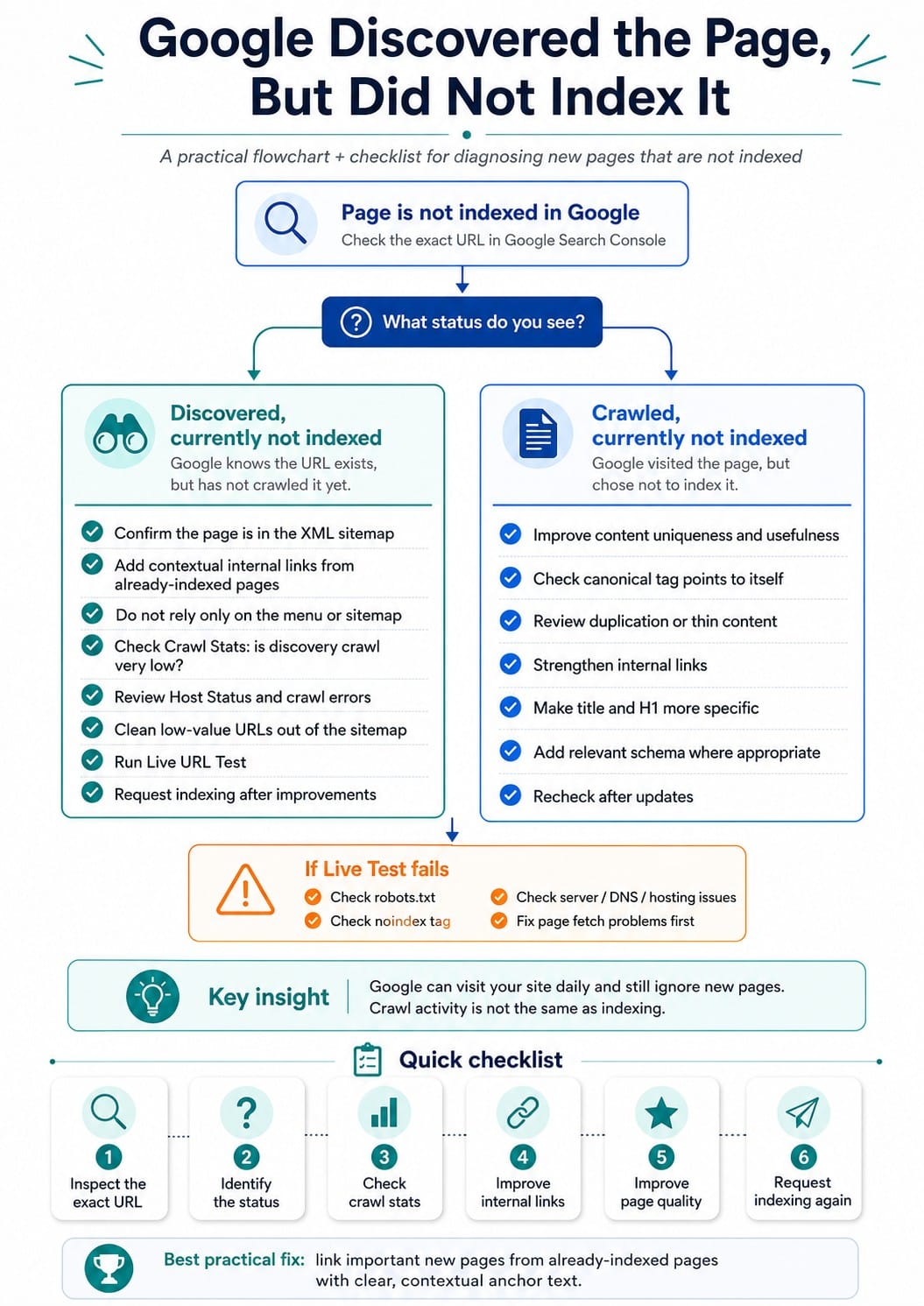
If Search Console says Discovered, currently not indexed, Google knows the page exists, often from a sitemap or internal link, but has not crawled it yet.
This is usually not a WordPress problem, sitemap problem, or robots.txt problem. In many cases, it is a crawl priority problem.
Google may be spending most of its crawl activity refreshing old pages instead of discovering and crawling new ones.
The problem: Google is visiting the site, but new pages are not indexed
A common confusing situation is this:
Google Search Console shows that Googlebot is visiting the site almost every day. But new pages still say:
URL is not on Google
And under Page indexing:
Page is not indexed: Discovered, currently not indexed
This feels contradictory, but it is not.
Google can visit your site daily and still ignore new pages.
For example, Google may be crawling:
- The homepage
- Existing service pages
- JavaScript files
- CSS files
- Images
- Old blog posts
- Sitemap files
- Already indexed pages
But it may not be crawling the new page you care about.
That is the key distinction.
What “Discovered, currently not indexed” really means
In Search Console, this status usually means Google knows the URL exists, but has not crawled it yet.
You may see fields like:
- Last crawl: N/A
- Crawled as: N/A
- Crawl allowed?: N/A
- Page fetch: N/A
- Indexing allowed?: N/A
Those N/A values are important.
They usually mean Google has not even fetched the page yet.
So Google has not rejected the page after reviewing the content. It has not evaluated the content at all.
It is sitting in Google’s discovered URL queue.
This is different from “Crawled, currently not indexed”
These two statuses are often confused.
| Search Console status | Meaning | Main problem |
|---|---|---|
| Discovered, currently not indexed | Google knows the URL but has not crawled it yet. | Crawl priority or crawl demand |
| Crawled, currently not indexed | Google crawled the page but chose not to index it. | Content quality, duplication, weak value, or canonical issues |
If the status is Discovered, the issue is usually before content evaluation.
If the status is Crawled, the issue is more likely content quality or indexability.
Why this can happen even when the page is in the menu
A page being in the menu helps.
But it may not be enough.
Sitewide menu links are often treated as basic navigational links. They tell Google the page exists, but they do not always strongly communicate importance.
A link inside the body content of an already indexed page can be stronger.
For example, a menu link that says:
- Careers
is useful.
But a homepage content section that says:
XYZ company is currently hiring fully licensed therapists in Stone Oak, TX. View our counseling career opportunities here.
with a direct link to the careers page may send a clearer signal.
The difference is context.
Google may treat boilerplate navigation differently from meaningful body content.
Why the sitemap alone is not enough
A sitemap helps Google discover URLs.
But a sitemap does not force Google to crawl or index those URLs.
This is a common misunderstanding.
You can have:
- A correct sitemap
- A correct canonical tag
- No noindex tag
- No robots.txt block
- Proper WordPress links
- Manual indexing request submitted
And Google may still delay crawling or indexing.
A sitemap says, “Here are URLs available on my site.”
It does not say, “Google must crawl these now.”
What the crawl stats can reveal
The most important Search Console data often comes from the Crawl Stats report.
In one example, the site showed:
- Total crawl requests: about 1.84K over roughly 3 months
- Average response time: around 464 ms
- Host status: green, but with “host had problems in the past”
- Response codes mostly okay
- By purpose:
- Refresh: 97%
- Discovery: 3%
That last part matters most.
Refresh crawling vs discovery crawling
| Crawl purpose | Meaning |
|---|---|
| Refresh | Google is revisiting URLs it already knows. |
| Discovery | Google is crawling new URLs or trying to find new content. |
If 97% of crawling is refresh and only 3% is discovery, Google is mostly revisiting old pages.
That explains why new pages are stuck.
Google is active on the site, but not actively discovering and crawling new URLs.
Why crawl volume matters
A site may have about 1.84K crawl requests over about 3 months.
That sounds like a lot, but it is roughly around 20 crawl requests per day.
If only about 31% of crawls are HTML, Google may be crawling only a small number of actual pages per day.
The rest of the crawl activity may be going to:
- JavaScript
- CSS
- Images
- Other file types
- Old pages
- Redirects
- Sitemap URLs
So even though Googlebot appears active, the amount of new-page crawling may be very low.
The likely diagnosis
The likely issue is not:
- WordPress
- Broken hyperlinks
- Missing sitemap
- Robots.txt blocking
- Noindex tag
- Menu not working
The likely issue is:
Google does not currently see enough reason to prioritize crawling new URLs on the site.
That is a site-level crawl demand issue.
In plain English: Google knows the pages exist, but the site does not currently have enough crawl priority for Google to fetch new pages quickly.
Why Google behaves this way now
Google has always said that crawling and indexing are not guaranteed.
But in practice, many site owners noticed that indexing became more selective over the last several years.
There is no single date when this began.
A practical timeline looks like this:
| Period | What changed |
|---|---|
| Before 2020 | Many normal WordPress pages were often crawled and indexed more easily. |
| 2020 to 2021 | Google’s mobile-first crawling and indexing systems became more central. |
| 2022 | Google’s Helpful Content systems raised the importance of usefulness and quality signals. |
| 2023 | Many sites began noticing more “Discovered” and “Crawled, not indexed” problems. |
| 2024 onward | Selective crawling and indexing became a normal SEO reality, especially for smaller sites. |
This does not mean Google suddenly stopped indexing pages in 2023.
It means the problem became much more visible.
The old assumption was:
Publish a page, add it to sitemap, and Google will index it.
The current reality is closer to:
Google may discover the page, but it will crawl and index it only when it sees enough reason.
Practical examples
Example 1: Career page in the menu but not indexed
A careers page may be linked in the main menu.
But if Google is mostly refresh-crawling old service pages, it may not prioritize the careers page.
What to do:
- Add a contextual link from the homepage.
- Add a short hiring section on an indexed page.
- Link to the careers page using descriptive anchor text.
- Make sure the careers page links clearly to individual job posts.
- Use JobPosting schema for job detail pages.
- Consider Google’s Indexing API for job posting URLs.
Example anchor text:
Counseling career opportunities in Stone Oak, TX
Better than:
Click here
Example 2: Job detail page discovered through sitemap but not crawled
A job post URL may appear in a job listing sitemap.
Search Console may show the sitemap as the referring source.
That means Google found the URL.
But if it still says Discovered, currently not indexed, Google has not crawled it.
What to do:
- Link to the job post from the main careers page.
- Link from the homepage if the job is important.
- Use specific anchor text.
- Add unique job content, not just generic job text.
- Add valid JobPosting schema.
- Submit through the Indexing API if appropriate.
Example 3: Monthly blog articles are not being indexed
Publishing one article per month does not guarantee indexing.
If the article is only linked from the blog archive, Google may not prioritize it.
What to do:
- Link to the article from an existing indexed service page.
- Add a related articles section on relevant pages.
- Link from the homepage temporarily.
- Link from Google Business Profile posts or social channels.
- Make sure the article answers a specific question better than existing pages.
- Avoid generic or duplicate counseling content.
For example, if the article is about grief, link to it from the indexed grief counseling page.
What to check in Google Search Console
1. URL Inspection
Inspect the exact URL.
Look for:
- Is the URL on Google?
- What is the page indexing status?
- Is it discovered or crawled?
- What sitemap discovered it?
- Is there a referring page?
- Is the canonical correct?
- Was the live test successful?
If the page says Discovered, currently not indexed, focus on crawl priority.
If it says Crawled, currently not indexed, focus on page quality and uniqueness.
2. Crawl Stats
Go to:
Google Search Console > Settings > Crawl stats
Review:
- Total crawl requests
- Average response time
- Host status
- Crawl requests by response
- Crawl requests by file type
- Crawl requests by purpose
- Crawl requests by Googlebot type
The most important section in this situation is By purpose.
If discovery is very low, Google is not spending much effort finding new content.
3. Host status
If Search Console says Host had problems in the past, click into it.
Check whether the issue was:
- DNS
- Server connectivity
- Robots.txt fetch
- Server errors
Even if the site is fine now, past host problems can make Google crawl more cautiously for a while.
4. Crawl requests by response
Look for unnecessary crawl waste.
Possible problems:
- Too many 404s
- Too many redirects
- Repeated crawling of old deleted URLs
- Broken internal links
- Parameter URLs
- Junk URLs
- Plugin-generated URLs
A small number of 404s is normal.
But if Google is wasting crawl attempts on junk URLs, clean them up.
5. Sitemap quality
Do not only check whether the sitemap exists.
Check whether the sitemap contains only valuable indexable URLs.
Remove or noindex low-value URLs such as:
- Tag archives
- Author archives
- Date archives
- Attachment pages
- Empty taxonomy pages
- Thin job archives
- Internal search URLs
- Duplicate service/location combinations
- Old pages that should not rank
A bloated sitemap can make the site look weaker.
What to do if Google is mostly refresh-crawling
Use already-indexed pages to push new pages
This is the most practical fix.
Find pages Google already crawls often.
These might include:
- Homepage
- Main service pages
- Existing blog posts
- Counselor profile pages
- High-value location pages
Then add contextual links from those pages to the new pages.
Do not rely only on:
- Sitemap
- Header menu
- Blog archive
- Footer
- Request indexing
Those help, but they may not be enough.
Add contextual links, not only navigation links
A contextual link is a link inside the page content.
Example:
We are currently hiring licensed counselors in Stone Oak, TX. View our current counseling career opportunities here.
This gives Google more context than a menu item alone.
Make important pages more visibly important
For pages that matter, use multiple signals:
- Link from homepage
- Link from relevant service page
- Include in sitemap
- Use clean canonical tag
- Add schema where appropriate
- Add unique content
- Link from Google Business Profile or other external places if reasonable
- Request indexing after improvements
Common mistakes and misconceptions
Mistake 1: “Google crawled my site, so it crawled my new page”
- Not necessarily.
- Google may crawl the site but not the specific new URL.
- Always inspect the exact URL in Search Console.
Mistake 2: “The page is in the sitemap, so Google should index it”
- A sitemap helps with discovery.
- It does not guarantee crawling or indexing.
Mistake 3: “The page is in the menu, so it must be important to Google”
- A menu link helps, but it may not be enough.
- Google may treat repeated navigation links as boilerplate.
- Contextual links from indexed content can be stronger.
Mistake 4: “Request indexing will fix it”
- Request indexing can help, but it is not a long-term solution.
- If the site has low crawl demand, repeated indexing requests will not fix the underlying issue.
Mistake 5: “This must be a WordPress issue”
- Not always.
- WordPress can have SEO problems, but in this case the evidence points more toward Google crawl priority.
- If the page is valid, linked, indexable, and in the sitemap, but Google still has not crawled it, the issue is likely Google’s prioritization.
Additional questions readers may have
Does Google ignore menu links?
- No.
- Google does not ignore menu links.
- But Google may not treat every menu link as a strong signal of page importance.
- A link inside the main body content of a relevant indexed page can be more meaningful.
- Best practice: use both.
How long should indexing take?
There is no guaranteed timeline.
It may take:
- Hours
- Days
- Weeks
- Longer
For lower-priority sites or lower-priority pages, it can take much longer than expected.
Is “Discovered, currently not indexed” a penalty?
- Usually, no.
- It does not automatically mean the site is penalized.
- It means Google knows the URL but has not crawled it yet.
- However, if many URLs are stuck there, it may indicate low crawl demand or weak site-level quality signals.
Should I delete pages that are not indexed?
Not automatically.
First determine why they are not indexed.
Keep pages that are useful to users or business goals.
But consider improving, consolidating, or removing pages that are:
- Thin
- Duplicative
- Outdated
- Low-value
- Not internally linked
- Not intended to rank
Should I noindex low-value pages?
Sometimes, yes.
If certain pages are useful for users but not useful for search, noindex may be appropriate.
Examples might include:
- Internal search pages
- Thin archive pages
- Some tag pages
- Duplicate taxonomy pages
Be careful with noindex. Do not noindex pages that you actually want in Google.
Should I use the Google Indexing API?
For normal blog posts, generally no.
The Indexing API is mainly intended for specific page types such as job posting pages and livestream video pages.
For job listing URLs, it may be worth considering.
For regular articles, focus on internal linking, quality, sitemap cleanliness, and external signals.
FAQ
What does “Discovered, currently not indexed” mean?
It means Google knows the URL exists but has not crawled it yet.
This is usually a crawl priority issue.
What does “Crawled, currently not indexed” mean?
It means Google crawled the page but chose not to index it.
This is more often related to quality, duplication, canonical issues, or weak value.
Why does Search Console show N/A for crawl details?
Because Google has not crawled the page yet.
If there is no last crawl date, Google has not fetched the URL.
Is my page blocked?
Not necessarily.
If Search Console says Discovered, currently not indexed and crawl fields are N/A, Google has not yet tested the page.
To check blocking, use Test Live URL in URL Inspection.
Is the sitemap broken?
Not necessarily.
If Search Console shows the sitemap under Discovery, then the sitemap likely helped Google find the URL.
The problem is that discovery did not turn into crawling.
Is this because of bad hosting?
Maybe, but not always.
If Crawl Stats says “Host had problems in the past,” inspect that section.
Past DNS, robots.txt, or server connectivity issues may reduce Googlebot confidence.
But if current host status is green and 5XX errors are low, hosting may not be the main issue.
Why are old pages crawled but new ones ignored?
Because Google may be doing mostly refresh crawling.
That means it is revisiting known URLs instead of discovering and crawling new URLs.
This is visible in Search Console under:
Settings > Crawl stats > By purpose
What is the best practical fix?
Add contextual internal links from already-indexed, frequently crawled pages to the new pages.
For example:
- Homepage to careers page
- Careers page to job detail page
- Service page to related blog post
- Location page to related service page
- Counselor page to relevant service page
Needs verification before publishing
Before publishing this article, verify the following against current Google documentation:
- The current wording of Google’s documentation for crawling, indexing, sitemaps, “Discovered, currently not indexed,” and “Crawled, currently not indexed.”
- Whether Google’s Indexing API is still officially limited mainly to JobPosting pages and BroadcastEvent or livestream-related pages.
- Current Google Search Console UI labels, since Google may change wording or navigation.
- Any claim about timeline, especially Helpful Content Update timing, mobile-first indexing completion, and when SEOs broadly noticed indexing delays.
- Whether the specific website’s sitemap, robots.txt, canonical tags, and live URL test results still match the observations.
Official Google sources to verify before publishing:
- https://developers.google.com/search/docs/crawling-indexing/overview
- https://developers.google.com/search/docs/crawling-indexing/sitemaps/overview
- https://support.google.com/webmasters/answer/7440203
- https://developers.google.com/search/apis/indexing-api/v3/quickstart
Final checklist
URL-level checks
- Inspect the exact URL in Search Console.
- Confirm whether the status is Discovered or Crawled.
- Run Test Live URL.
- Confirm page fetch is successful.
- Confirm indexing is allowed.
- Confirm canonical tag points to itself.
- Confirm the page is in the sitemap.
- Confirm the page has internal links.
Site-level checks
- Review Crawl Stats.
- Check the percentage of discovery crawling.
- Check host status.
- Review 404s and redirects.
- Review sitemap quality.
- Remove low-value URLs from sitemap.
- Improve links from already-indexed pages.
Practical action steps
- Add contextual body links from indexed pages.
- Link important new pages from the homepage.
- Link related blog posts from relevant service pages.
- Use descriptive anchor text.
- Improve thin or duplicate content.
- Use JobPosting schema for job pages.
- Consider the Indexing API for job postings.
- Request indexing only after improving the page and links.
Main conclusion
If Google says Discovered, currently not indexed, the page is not necessarily blocked or broken.
Google may simply not be prioritizing the crawl.
The solution is to increase the page’s importance through stronger internal links, cleaner sitemaps, better content, and better site-level crawl signals.